
Your Apple Watch + Strathlon: live heart rate, hands-free
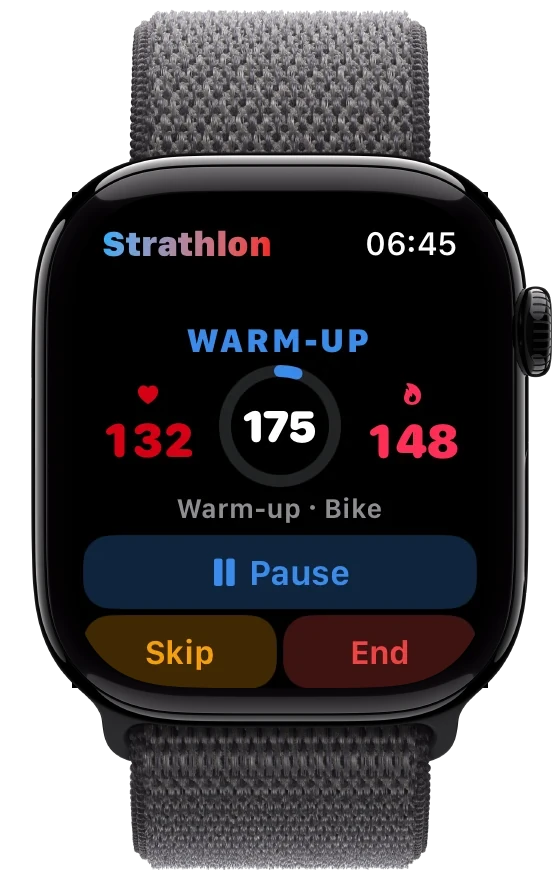
Strathlon turns your Apple Watch into a proper training companion: live heart rate streamed beat-by-beat, the workout started for you automatically, and each block saved to Apple Health as its own workout*.
The one-time setup (about a minute)
You only need to do this once:
- Open the Strathlon watch app on your Apple Watch one time. Just launching it once is enough: after that you can leave it closed.
- Allow Health access when prompted. This is what lets your heart rate flow through to your phone.
That's it. From then on, when you start a session on your phone (warm-up, workout or HIIT), Strathlon starts the recording on your watch for you, even if the watch app is closed. Your live heart rate appears straight away, shown as a clear two-colour cue: red when you're at or above your target level, bright amber when you're below.
One rule: don't also start Apple's Workout app yourself
While Strathlon is recording on your watch, do not open Apple's own Workout app and start a workout there too. If you run both at once, your calories get counted twice and your numbers stop being honest. Let Strathlon drive. It records as one continuous workout of the right type (warm-up, strength, HIIT) with calories and duration, so it shows up correctly in Apple Health and your Fitness rings on its own.
Without a watch, you still get a live heart rate during warm-ups and HIIT, read from Apple Health where recent data is available. It's just slightly less instant than a wrist reading.
Reading your workouts in Apple Health
One thing that trips people up comes from Apple's own design. In Apple's Fitness app, the workout list shows duration as the big number for every workout (a 20-minute session reads "0:20") rather than calories. That's simply how Apple lays the list out, the same for a strength session as for anything else. Your calories are still recorded: tap into any workout to see active calories, heart rate and the rest. And while you train, Strathlon shows your live calories burned versus your target right on your wrist and in the app, so you always know where you stand without digging through Apple's screens.
What your watch can do
- With your Apple Watch: automatic workout start on your wrist, live streaming heart rate, and each block saved to Apple Health with the right type, calories and duration.
- Hands-free: run the whole workout from your wrist. Your watch shows the current exercise, your set ("Set 2 of 4") and the rep target with one big button. Tap Done and your phone logs the set and starts your rest countdown. A tap during rest skips it. It carries you from warm-up through every set and rest to your HIIT finisher, so you never reach for your phone.
If your heart rate ever looks stale, give the watch a moment. Strathlon holds your last reading and gently dims it when it's a little old, rather than blanking out.